
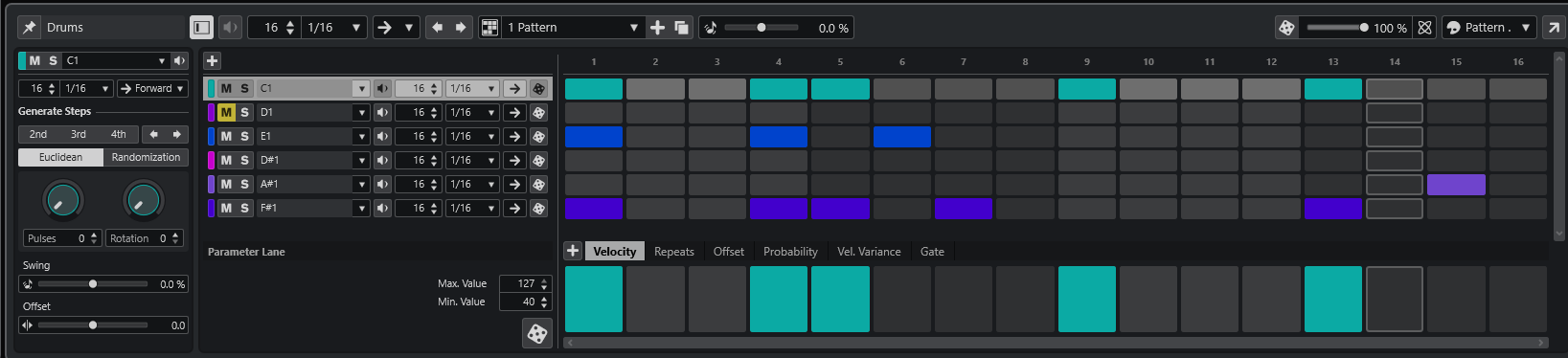
Something that I have struggled with in the past, and the present too, has been adding drum tracks to music. I am not talking about orchestral music particularly here even though that is the direction I am focusing on mostly nowadays, but on the guitar, bass, drums kind of music,
I have been playing around with some of the methods of creating drum patterns in Cubase 14 lately and have been trying to learn this skill. I am not there yet, but I am at least learning a lot.
In Cubase there are two main tools to aid in the creation of drum tracks. These are
- Pattern editor
- Groove Agent 5
I have been investigating both of these.
The Pattern Editor
- Ideal for step‑sequencing beats
- Perfect for electronic, pop, hip‑hop, and educational examples
- Fast, visual, and great for beginners
- Lives directly inside the MIDI editor

Groove Agent 5
- A full drum workstation
- Includes acoustic kits, electronic kits, MIDI styles, and sound‑design tools
- Lets you drag grooves, samples, and patterns into Cubase
- Offers deep mixing, layering, and performance features

It appears that making use of a combination of these is the way forward with Groove Agent being used for sounds and styles, and the Pattern Editor allowing precise programming.
There are numerous drum kits available in Groove Agent 5 from ‘The Kit’ for acoustic realism through ‘Beat Agent’ kits for electronic genres and ‘Third‑party’ kits allowing the use of your own samples.
With the pattern editor we have a visual representation of the pattern that we are creating. It is a step sequencer that allows us to divide the bar up into whatever beats division we want and then add hits to whichever beat we desire for each drum, cymbal, percussion sound, etc. that we want.
I like this process a lot as it simplifies things for me and allows me to see visually what I am doing and relate it theoretically to things.
The pattern editor gives us the advantage of
- Instant visual feedback
- Adjustable step resolution (1/4 to 1/64)
- Per‑step velocity and probability
- Easy to loop and duplicate
- Perfect for learning and identifying rhythmic subdivisions
Combining Groove Agent 5 with the pattern editor (or using a standard MIDI track) allows me to build up drum tracks.
You can create a pattern that applies to certain bars, then create a different pattern and apply that in different places. The thing I often struggled with was that I had a drum pattern, but it remained the same the whole way through the song. Now I can create multiple patterns to allow drum fills and changes of drum pattern for different parts of a song.

Fantastic!
Lots to learn still, but I am having fun with it.
Leave a Reply